
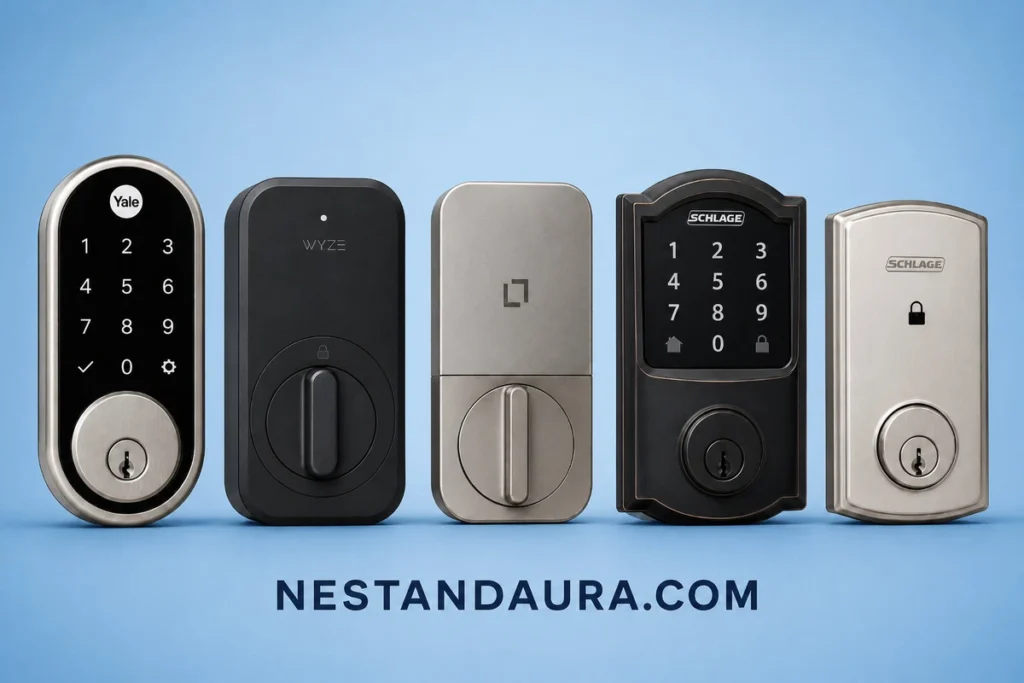
The best smart locks are different for every door. The right pick depends on your phone, whether you already have a smart hub, your budget, and how comfortable you are storing your door access on a company’s servers.
Consider this your best smart locks 2026 shortlist, covering real-world scenarios: budget constraints, people with an all-Apple lineup, Zigbee and Z-Wave configurations, and those who prefer that their smart lock does not communicate back to base. You will get a rating for each selection, along with a realistic price range and some tips on where to check the price now. Smart lock prices can fluctuate wildly across Amazon, the company’s website, and big box stores, so don’t expect us to give you any price today that will be good in six months from now.
Not every lock here fits every door. Some suit one kind of setup better than others, and one is built to avoid the cloud altogether. Read each pick’s description before you buy.
Best Smart Locks in 2026: Quick Picks
| Model | Rating | Price range | Key strength | Ecosystem support |
|---|---|---|---|---|
| Yale Assure Lock 2 | 4.7/5 | $200–$290 | Broadest overall compatibility | Apple Home, plus Alexa, Google and SmartThings via modules |
| Wyze Lock Bolt v2 | 4.2/5 | Under $100 | Lowest price, built-in fingerprint reader | Alexa, Google Assistant, Wyze app |
| Level Lock | 4.4/5 | $200–$250 | Fully local, no cloud required | Bluetooth, Wi-Fi via optional Connect bridge |
| Schlage Encode Plus | 4.5/5 | $230–$330 | Apple Home Key, Grade 1 security | Apple Home, Alexa, Google Assistant |
| Schlage Connect | 4.4/5 | $220–$270 | Deep hub integration | Z-Wave Plus, Zigbee |
| Lockly Visage Zeno | 4.6/5 | About $350 | Facial recognition, Apple Home Key | Apple Home, Alexa, Google Home |
- Best overall: Yale Assure Lock 2. It works with Apple Home, and modules add Alexa, Google and SmartThings. It costs about $200 to $290.
- Best budget: Wyze Lock Bolt v2. It replaces your deadbolt and has a fingerprint reader, Wi-Fi, and Alexa and Google support. It costs about $80.
- Best offline: Level Lock. It works over Bluetooth with no hub or subscription. It costs about $200 to $250.
- Best for Apple: Schlage Encode Plus. It supports Apple Home Key and also works with Alexa and Google. It costs about $230 to $330.
- Best for hubs: Schlage Connect. It supports Z-Wave Plus or Zigbee. It costs about $220 to $270.
- Best with facial recognition: Lockly Visage Zeno. It has facial recognition, a fingerprint reader and Apple Home Key. It costs about $350.
Prices checked October 2026.
How we picked these
We didn’t just grab the locks with the most five-star reviews for this best smart locks 2026 guide. Every pick on this list of top rated smart locks had to hold up against five things: a track record of reliable performance and responsive customer support, compatibility with the ecosystems people actually use, whether it still works when the internet doesn’t, how loud it is at 11pm, and whether the price matches what you actually get.
In our research process, we relied on information from manufacturers’ specifications, product reviews from other media, and user experience from discussions in forums and on Reddit where users discuss things such as stuck locks, slow apps, and waking up the entire household due to noisy motor operation. We did not include locks that performed beautifully in their specifications but broke down after eight months.
Best overall smart lock: Yale Assure Lock 2
Nest & Aura rating: 4.7/5
Of all the best smart locks we looked at, the Yale Assure Lock 2 is the safest recommendation because it doesn’t force you to pick a team. It works with Apple Home out of the box, and Wi-Fi and Z-Wave modules add Alexa, Google Home and SmartThings. You can unlock it with a keypad code, a physical key (keyed models), a fingerprint (Touch model), or your iPhone through Apple Home Key (Plus model). Check Yale’s site for the current Matter module.
Installation takes most people under 20 minutes, even without a pre-drilled door. Battery life runs a few months on Wi-Fi and closer to nine months if you’re running it over Bluetooth only. The keypad requires a tap on the Yale logo before it wakes up, which trips up first-time users, but it’s a minor quirk on an otherwise dependable lock.
Price and where to buy: Mid-range, typically landing between $200 and $290 depending on finish and whether you add the keypad. Check current pricing on Amazon, Yale’s own site, and Lowe’s or Best Buy, since it rotates through sales fairly often at all three.
Best budget smart lock: Wyze Lock Bolt v2
Nest & Aura rating: 4.2/5
If your aim is a smart lock under $100, the Wyze Lock Bolt v2 is the one to get. It replaces your existing deadbolt, and it has a fingerprint reader, a keypad, built-in Wi-Fi, and Alexa and Google Assistant support. The older Lock Bolt is Bluetooth only, so make sure you buy the v2.
It will never have the same feeling as a $250 lock, and its app isn’t as advanced as those offered by Yale or Schlage, but for a beginner’s smart lock, a rental property or a side door which doesn’t require the best locks, it’s a good deal.
Price and where to buy: Budget tier, generally under $100. Check Amazon and Wyze’s own store first, since third-party retailers rarely beat their pricing on this one.
Best smart lock for offline or local-only use: Level Lock
Nest & Aura rating: 4.4/5
Not everyone wants their door lock talking to a cloud server. If that’s you, the Level Lock is the strongest pick here. It runs entirely over Bluetooth with no required Wi-Fi bridge, no hub, and no subscription. Your phone key and access data stay on the device and your phone, not on someone else’s server.
The tradeoff is that without the optional Level Connect bridge, you lose remote unlocking and away-from-home guest codes. For a lot of people worried about data leaks or an outage taking down their front door, that’s a fair trade. It’s also the most physically discreet lock on this list. Everything hides inside the door, so from the outside it just looks like a normal deadbolt.
Price and Availability: Premium level, costs around $200-$250 for just the basic Bluetooth unit, but it will cost extra for the Connect Bridge & Keypad. Look for price differences between Amazon, Level’s website, and Best Buy where it is sometimes deeply discounted.
Best smart lock for Apple HomeKit and Home Key: Schlage Encode Plus
Nest & Aura rating: 4.5/5
The Schlage company got its reputation building commercial quality hardware. The Encode Plus model continues to carry its reputation into the field of smart locks as well. The Encode Plus is certified for the Apple Home Key, so you can use your iPhone or Apple Watch as an entry key by tapping them to the door without any need for an application, just as you would tap a hotel key card to unlock a door there.
Apple Home Key is the main reason to buy it, but it isn’t Apple-only. It also works with Alexa and Google Assistant through the Schlage Home app, so mixed iPhone and Android households can use it too. Home Key tap-to-unlock is the one feature that only iPhone and Apple Watch users get.
Price and where to buy: Premium tier, typically $230 to $330, and often on sale. Check Amazon, Schlage’s site, and Home Depot, since Home Depot tends to run Schlage-specific promotions a few times a year.
Best smart lock for Zigbee and Z-Wave hubs: Schlage Connect
Nest & Aura rating: 4.4/5
If you’ve already built out a smart home around a hub like SmartThings, Hubitat, or a Z-Wave controller, the Schlage Connect fits right in. It supports both Z-Wave Plus and Zigbee depending on the model you buy, so it plugs into thousands of existing smart home routines without needing its own separate app running in the background. Buy the Z-Wave Plus or Zigbee model that matches your hub, since they are separate versions.
This is the pick for people who think in automations: lock the door when the alarm arms, unlock it when a specific person’s phone connects to home Wi-Fi, that kind of thing. If you don’t already have a hub, this isn’t the lock to start with. It shines when it’s one piece of a bigger system.
Price and where to buy: Mid-to-premium tier, usually $220 to $270. Some finishes and models are discontinued, so confirm the exact model is in stock. Compare Amazon, Schlage’s site, and Lowe’s, where hub bundles sometimes include a discount on the lock itself.
Best smart lock with facial recognition: Lockly Visage Zeno
Nest & Aura rating: 4.6/5
The Lockly Visage Zeno unlocks when it recognizes your face, so you can walk up with full hands and the door opens. It also has a fingerprint reader, the PIN Genie keypad and Apple Home Key, and Wi-Fi is built in, so you don’t need a hub. Lockly says the facial data stays on the lock and isn’t sent to servers.
It’s one of the pricier locks on this list, so check the current price before you buy.
Price and where to buy: Premium tier, about $350 at launch. Check Amazon, Lockly’s own site, and Home Depot, since pricing swings noticeably between them.
What to consider before buying
Keyhole vs. no keyhole
There are some advanced models of smart locks that do not provide for a key hole at all, banking on the fact that you will always have your mobile device, a code, or your fingerprint ready at hand. Other smart locks have a spare key hole just in case. There is no universal right choice in this respect either. Having the key hole allows you to unlock the door in case of the battery depletion or malfunctions of the application, yet it provides another means for an intruder to try picking the lock.
Battery type and real-world life
Most smart locks operate using four AA batteries. The companies normally claim six months to one year of battery lifetime. In practice, it will be rather closer to the minimum of those values. The use of Wi-Fi, regular app checks, as well as low temperatures, consume batteries much more quickly. There are some smart locks, such as certain models from Nuki and Aqara, which use rechargeable batteries.
Offline vs. cloud-connected
Remote control and guest access are available with a cloud-connected lock, and there is also a log of activities that you can review even when you are at work using your phone. However, the drawback here is that all your access credentials are stored on another person’s server. In case something happens to those servers or that company goes out of business, you will be unable to use the remote features of your lock. The Level Lock does not rely on any outside help; rather, it is private and Bluetooth-oriented.
Reliability and support
Even the big, trusted brands have shipped locks with firmware bugs, jammed motors, or app outages at some point. Before you buy any lock on this list, it’s worth a quick search for recent reviews from the last few months rather than relying only on a brand’s overall reputation. Companies change manufacturing partners and firmware teams, and a lock that was rock solid two years ago isn’t guaranteed to still be that way today. For a deeper look at what actually holds up under pressure, see our breakdown of the hardest lock to break.
It’s also worth checking how a brand handles support when something goes wrong. Response time on a jammed lock or a bricked app matters a lot more than it seems like it will until the day you’re actually locked out. A quick scan of recent one and two-star reviews will usually tell you more about a company’s support than its marketing page ever will.
None of the picks above include a video camera or doorbell, since that’s a different tradeoff around price, installation, and battery life. If seeing who’s at your door matters as much as the lock itself, our guide to the best smart door locks with camera covers that category separately.
FAQ
Schlage and Yale consistently show up with the strongest reliability track records and the longest histories in the physical lock business, which carries over into their smart lock support. That said, reliability varies by specific model and firmware version, so check recent reviews for the exact lock you’re considering rather than trusting the brand name alone.
They’re safer from a data privacy standpoint, since there’s no remote server storing your access logs or fingerprint data. They’re not necessarily more physically secure. A lock’s resistance to picking, drilling, or bumping comes down to its hardware grade, not whether it connects to the internet.
That depends on the model and is changing all the time based on sales, so there’s no definite answer to that question. Amazon usually offers the best price reductions, although websites of the manufacturers tend to offer even better discounts at certain holidays, and Lowe’s and Best Buy occasionally have bundle discounts.
Most do, at least partially. Nearly every smart lock on the market can still lock and unlock with a keypad code, a physical key, or Bluetooth even if your internet is down. What you lose without Wi-Fi is remote access and any features that route through the cloud, like sending someone a guest code while you’re not home.
Final thoughts
Picking the right one from our best smart locks 2026 lineup really comes down to matching the lock to how you actually live, not chasing the highest star rating. Whichever of these top rated smart locks fits your home, install it properly and test the backup entry method before you actually need it. If you’re still weighing whether a smart lock makes sense at all, our guide on are smart locks safe breaks down the security tradeoffs. If budget is the deciding factor, how much do smart locks cost walks through realistic pricing beyond the sticker price. And if you’re not sure a specific model will play nice with your existing setup, check smart lock compatibility before you buy.